
Downloading Google Docs as PDF or DOCX
Importing…There are occasions when it is necessary to download a Google Doc in another format such as PDF or DOCX. This process is super simple. The same process works with Sheets (PDF or Excel) and Slides (PDF or PowerPoint). This is useful when sending an email attachment as a specific file type or when uploading a document to a web portal. For example, EES artifacts are easier to upload as a PDF.
With the Google Doc open:
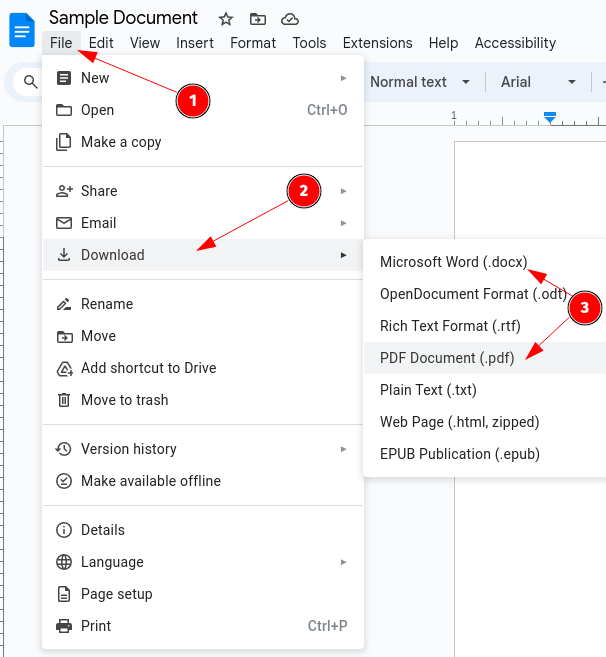
Click On File
Click Download
Select the type of file to be downloaded. Typically either DOCX or PDF
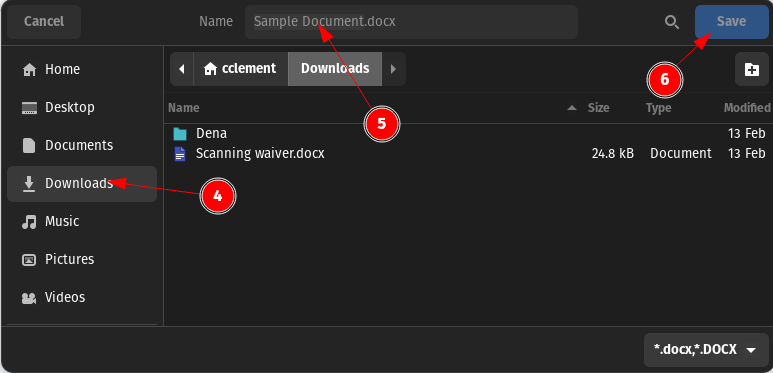
Navigate to the download location of your choosing
Rename the document is you desire. Be sure to leave the file extension. (DOCX, PDF, etc.)
Click Save
Originally posted by Carl Clements on the West Fork Technology Hub (2024-02-20).