
Grammarly Extension
Grammarly is a free extension for Chrome and other web browsers. It is a powerful tool that checks for spelling, punctuation, and grammar mistakes.
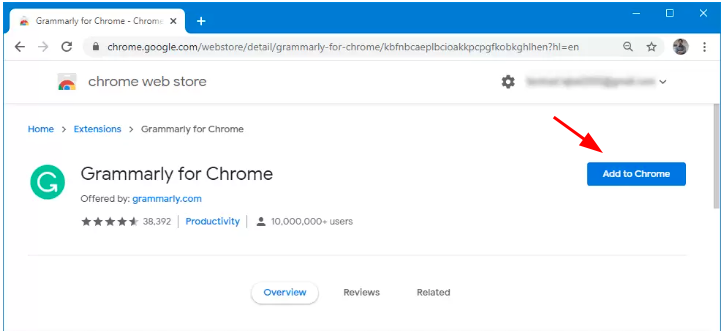
To install Grammarly open the Chrome web browser and click this link: https://chrome.google.com/webstore/detail/grammarly-grammar-checker/kbfnbcaeplbcioakkpcpgfkobkghlhen?hl=en-US
Click the Add to Chrome button and follow the prompts.
(It also works with Safari, Firefox, and Edge.)
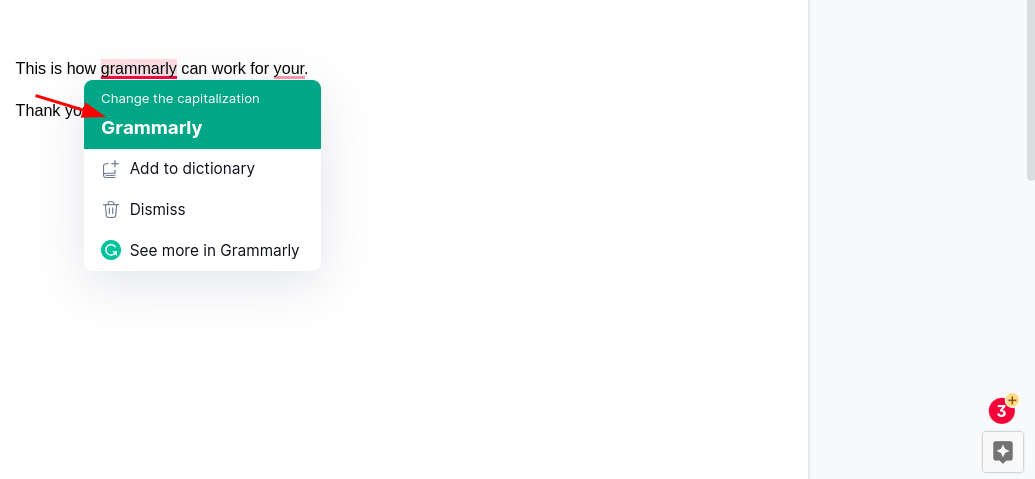
Once installed, it will proofread your writing in Chrome as you type. It works automatically in Gmail, Google Docs, and many other applications. It currently does not work in Google Sheets or Slides. Anything identified as suspicious will be underlined in red. This example has a capitalization error, an incorrect word, and missing punctuation. Grammarly will display a total of potential errors at the bottom right of the screen.

To clear the potential errors click on the underlined word or sentence and either accept the change recommended or choose “Dismiss” to ignore the suggestion. Choose “Add to dictionary” for uncommon words that are correct, but identified as an issue. ie: eSchool
Over time Grammarly will send reports by email that indicate your productivity, mastery, vocabulary, and tone. Not life-changing but fun to look at!
Originally posted by Carl Clements on the West Fork Technology Hub (2023-03-14).
No comments to display
No comments to display